0
How to Pay with MoMo on Jumia and Melcom in 2026: Complete Guide
Mobile Money Powers Ghana’s E-Commerce in 2026
Mobile money penetration in Ghana has crossed 85% of the adult population in 2026, and e-commerce platforms have deepened their integrations. MTN MoMo, Vodafone Cash (now Telecel Cash), and AT Money (formerly AirtelTigo Money) are embedded directly into every major shopping platform’s checkout flow.
But the payment experience has evolved since 2024. Here’s what’s new and how to pay safely on Jumia and Melcom right now.
What Changed in Ghana’s Mobile Money Landscape
- Telecel Cash rebrand: Vodafone Ghana was acquired and rebranded to Telecel in 2024. Vodafone Cash is now Telecel Cash. The USSD code remains *110#, and all previous Vodafone Cash balances and services transferred seamlessly.
- AT Money consolidation: AirtelTigo Money was officially rebranded to AT Money in 2024 with improved USSD reliability (*500# remains the code).
- MoMo contactless payments: MTN rolled out NFC tap-to-pay for delivery riders in Accra and Kumasi. You can now tap your phone to the rider’s POS device instead of dialing USSD.
- E-levy 2025 revision: The e-levy now applies a flat 0.5% on all mobile money transactions above GH₵2,000 daily cumulative, including e-commerce payments. Platforms now show this as a separate checkout line item.
- GhQR universal code: Both Jumia and Melcom now support GhQR at online checkout—scan a QR code with any mobile money app to pay instantly, bypassing USSD entirely.
How to Pay with MoMo on Jumia Ghana (2026)
Method 1: Direct MoMo (USSD)
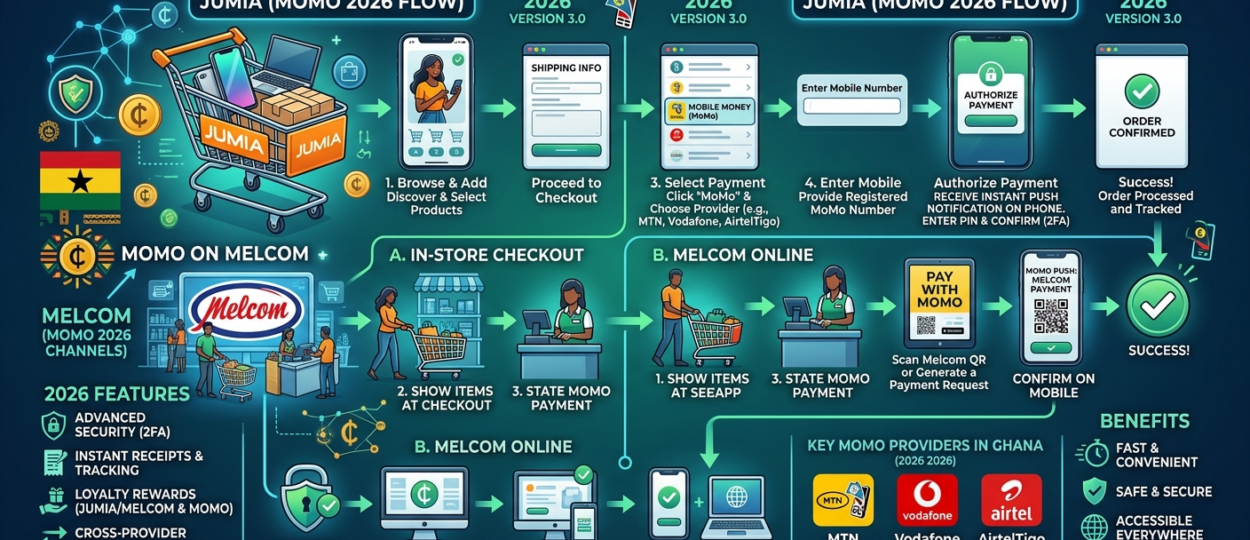
Step 1: Add items to cart on Jumia.com.gh and click “Checkout.”
Step 2: Under “Payment Method,” select your provider: MTN Mobile Money, Telecel Cash, or AT Money.
Step 3: Enter your mobile money-linked phone number. Jumia now auto-detects your network based on the prefix and pre-selects it for you.
Step 4: Click “Confirm Order.” Jumia’s 2026 checkout triggers a direct payment request to your phone immediately.
Step 5: Authorize the payment:
- MTN MoMo: You’ll receive a USSD prompt. Dial *170# > Select “Pending Approvals” > Enter your MoMo PIN to confirm. New: If you’ve enabled MTN’s “Tap to Pay,” simply hold your phone near your screen’s QR code and authenticate with biometrics.
- Telecel Cash: Prompt arrives via *110#. Approve with PIN.
- AT Money: Prompt via *500#. Approve with PIN.
Step 6: Wait for the Jumia confirmation page. Do not close the browser during processing. You’ll also receive an SMS, in-app notification, and email receipt.
Method 2: GhQR (New in 2026)
Jumia now displays a GhQR code at checkout. Open any mobile money app (MTN MoMo, Telecel Cash, AT Money, or bank apps like GCB, Ecobank), scan the code, and authenticate. This is faster than USSD and eliminates wrong-number errors entirely.
How to Pay with MoMo on Melcom Online (2026)
Method 1: Direct MoMo
Step 1: Shop at Melcom.com, fill your cart, and proceed to checkout.
Step 2: Select Mobile Money as your payment method. Melcom’s system now shows your available balance (with your permission) via the GhQR integration—a new 2026 feature that prevents failed payments due to insufficient funds.
Step 3: The payment prompt arrives on your phone. Authorize with your PIN.
Step 4: Melcom’s page refreshes with a “Payment Successful” confirmation.
Method 2: Pay on Delivery with MoMo
Melcom still offers Pay on Delivery, and you can now pay the delivery rider via:
- The rider’s MoMo merchant QR code (scan and pay)
- Direct MoMo transfer to the rider’s registered Melcom merchant number
- Cash (still accepted)
You can inspect your package before paying—a Melcom advantage Jumia doesn’t match.
What to Do If Payment Fails in 2026
Failed MoMo payments remain a pain point, but recovery is faster now:
- Don’t retry immediately. Wait 5-10 minutes. 2026 processing is faster, and double-charge auto-reversals now trigger within 30 minutes in most cases.
- Check your MoMo balance. Confirm whether the debit actually occurred.
- Save the transaction ID from your SMS or USSD transaction history menu.
- Contact the platform:
- Jumia: In-app live chat or WhatsApp support line (new 2025 channel). Provide transaction ID.
- Melcom: WhatsApp +233 544 333 555 or in-app support. Melcom added WhatsApp support in 2025.
- Refund timelines (updated 2026):
- Jumia: 2-5 business days (down from 3-7 in 2024)
- Melcom: 3-5 business days (down from 5 in 2024)
- Auto-reversal (stuck transactions): 24-48 hours (down from 72 hours)
2026 MoMo Security Tips
- Never share your PIN with delivery riders, even if they claim the “system requires it.” No legitimate platform asks for your MoMo PIN.
- Verify merchant numbers: Before sending MoMo to a rider for Pay on Delivery, confirm the number matches Melcom’s registered merchant line (the rider’s official ID badge now includes a scannable verification QR).
- Use GhQR when possible: It eliminates manual number entry errors—the number one cause of payments sent to wrong recipients.
- Enable transaction notifications: All three mobile money providers now push real-time app notifications. Turn them on so you see debits instantly.
- E-levy awareness: If your order total exceeds GH₵2,000, expect the 0.5% e-levy line item at checkout. It’s legitimate—not a hidden fee.
Mobile Money Provider Codes (2026 Quick Reference)
| Provider | USSD Code | Customer Support |
|---|---|---|
| MTN MoMo | *170# | Dial 100 |
| Telecel Cash (formerly Vodafone Cash) | *110# | Dial 200 |
| AT Money (formerly AirtelTigo Money) | *500# | Dial 100 |
Compare every payment method, delivery timeline, and shopping platform in Ghana—including new 2026 entrants—in our updated online shopping in Ghana guide.